Showing posts with label 1BestariNet. Show all posts
Showing posts with label 1BestariNet. Show all posts
Sunday, February 21, 2016

Sunday, January 24, 2016
The Lilypad
1: http://issuu.com/frogasia/docs/the_lilypad
2: http://issuu.com/frogasia/docs/__2__the_lilypad/1
3: http://issuu.com/frogasia/docs/30012013/1
4: http://issuu.com/frogasia/docs/marchlilypad2014_fullcompile
5: http://issuu.com/frogasia/docs/_lilypad__030415__5_april_full_comp
6: http://issuu.com/frogasia/docs/_lilypad__060515__6_may_full_compil/1
7: http://issuu.com/frogasia/docs/_lilypad__12june15__7_may_full_comp/1
8: http://issuu.com/frogasia/docs/_full_compile__lp8
9: http://issuu.com/frogasia/docs/_lilypad__09sept15__9sept_full_comp/1
*10: http://issuu.com/frogasia/docs/_splash___12nov15__10sept_online
10: http://issuu.com/frogasia/docs/_lilypad__29sept15__10sept_content_/1
Source: https://issuu.com/frogasia
2: http://issuu.com/frogasia/docs/__2__the_lilypad/1
3: http://issuu.com/frogasia/docs/30012013/1
4: http://issuu.com/frogasia/docs/marchlilypad2014_fullcompile
5: http://issuu.com/frogasia/docs/_lilypad__030415__5_april_full_comp
6: http://issuu.com/frogasia/docs/_lilypad__060515__6_may_full_compil/1
7: http://issuu.com/frogasia/docs/_lilypad__12june15__7_may_full_comp/1
8: http://issuu.com/frogasia/docs/_full_compile__lp8
9: http://issuu.com/frogasia/docs/_lilypad__09sept15__9sept_full_comp/1
*10: http://issuu.com/frogasia/docs/_splash___12nov15__10sept_online
10: http://issuu.com/frogasia/docs/_lilypad__29sept15__10sept_content_/1
Source: https://issuu.com/frogasia
Wednesday, October 21, 2015
Tuesday, April 21, 2015
How to log in Yes Email
1. Go to page: https://www.yes.my/v3/1bestarinet.do
2. Then click 'hop in'

3. Key in Username and Password
4. Click Quick Launch and Email icon on top right

5. Finally you can check your Yes Mail
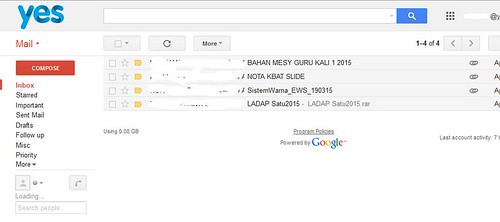
2. Then click 'hop in'
3. Key in Username and Password
4. Click Quick Launch and Email icon on top right
5. Finally you can check your Yes Mail
Sunday, February 1, 2015
How to Embed School Text Book online in FrogVLE site
1.Click EDIT
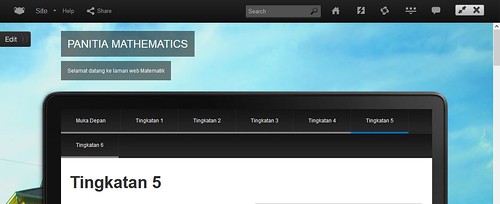
After clicking
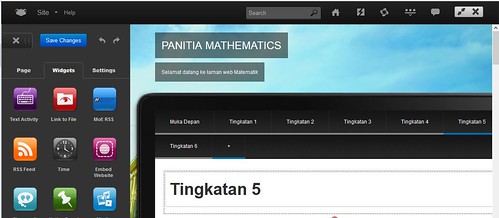
2.Drag EMBED WEBSITE to your site
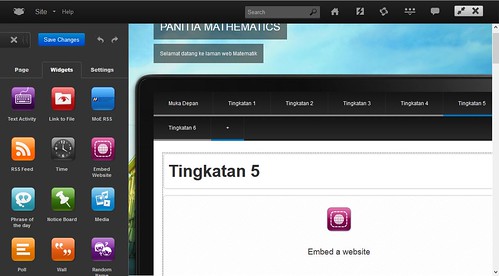
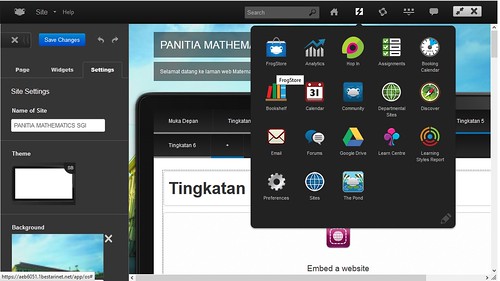
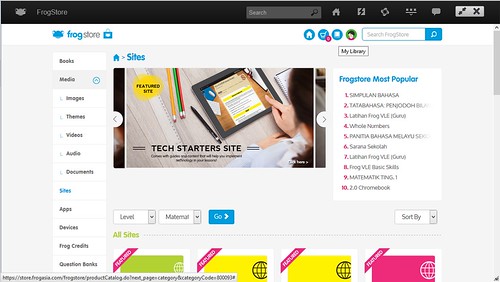
3.Go to QUICK LAUNCH and click FROGSTORE
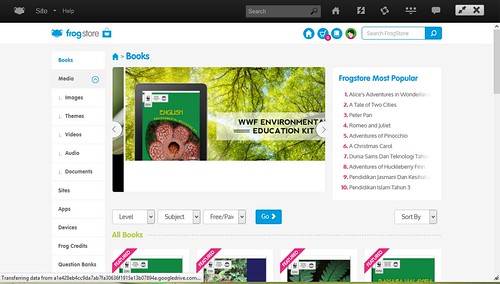
4.Click BOOKS
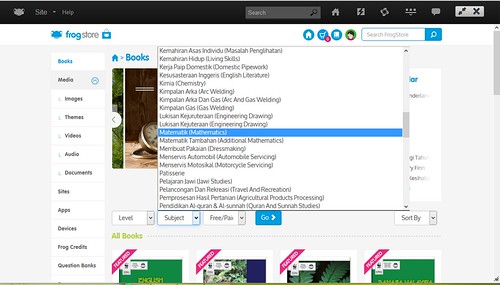
5.Select SUBJECTS you want then later click GO
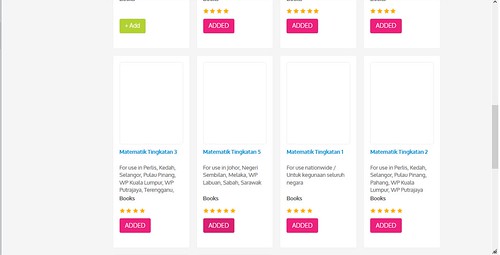
6.Select the books you want then ADD
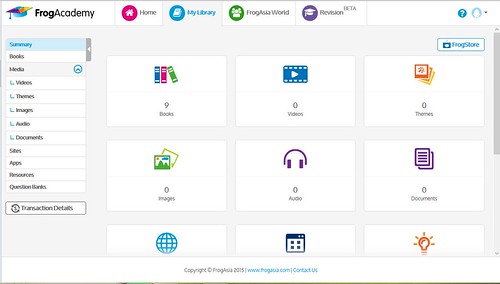
7.Click MYLIBRARY
8.Click BOOKS
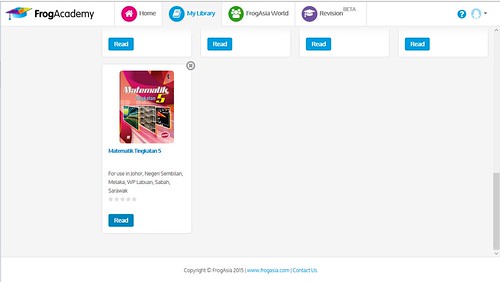
9.Click READ to select the text book
10.Copy the URL ADDRESS
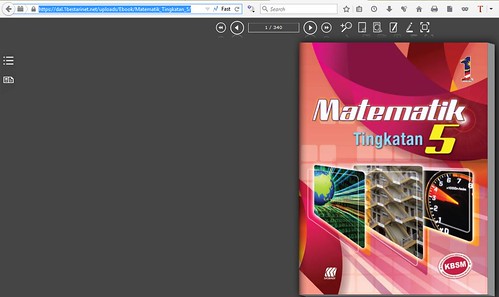
11.Paste the address in ENTER URL then change the height to 600. Later click SAVE CHANGES
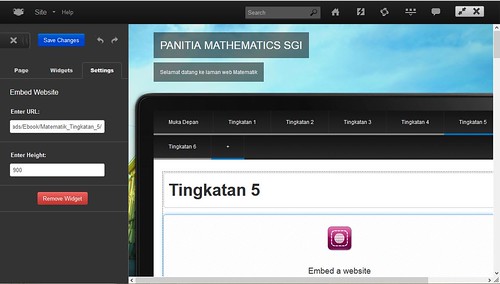
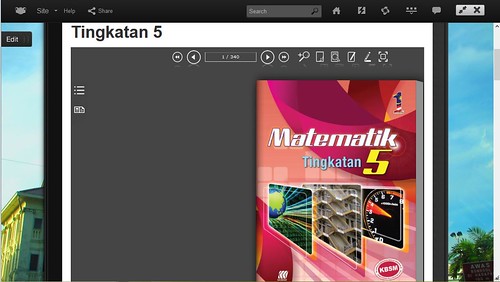
13.Finally
After clicking
2.Drag EMBED WEBSITE to your site
3.Go to QUICK LAUNCH and click FROGSTORE
4.Click BOOKS
5.Select SUBJECTS you want then later click GO
6.Select the books you want then ADD
7.Click MYLIBRARY
8.Click BOOKS
9.Click READ to select the text book
10.Copy the URL ADDRESS
11.Paste the address in ENTER URL then change the height to 600. Later click SAVE CHANGES
13.Finally
Wednesday, January 7, 2015


Saturday, February 15, 2014
Buku Teks Digital
Log in https://www.yes.my/v3/1bestarinet.do . Klik menu QUICK LAUNCH (bentuk kilat). Klik menu frogstore dan BOOKS.


Wednesday, November 13, 2013
Monday, November 4, 2013
Monday, September 30, 2013
Friday, March 15, 2013
1Bestarinet Update
Yes 4G Fix dalam Windows 8: http://metrosit.com/yes-4g-fix-dalam-windows-8/
http://www.youblisher.com/p/581687-1Bestarinet-Portal-Guide-v1-0/
PROJEK PERKHIDMATAN 1BESTARINET : PERMOHONAN SEKOLAH BAGI PENAMBAHAN CPE/ZOOM http://pelajaranperak.gov.my/perak/index.php?option=com_content&view=article&id=348
Pelaporan 1Bestarinet: http://pelajaranperak.gov.my/spict/
Roadshow http://www.1bestarinet.net/roadshow/
http://www.youblisher.com/p/581687-1Bestarinet-Portal-Guide-v1-0/
PROJEK PERKHIDMATAN 1BESTARINET : PERMOHONAN SEKOLAH BAGI PENAMBAHAN CPE/ZOOM http://pelajaranperak.gov.my/perak/index.php?option=com_content&view=article&id=348
Pelaporan 1Bestarinet: http://pelajaranperak.gov.my/spict/
Roadshow http://www.1bestarinet.net/roadshow/
Tuesday, February 12, 2013
Subscribe to:
Posts (Atom)